Client-Side vs Server-Side Tracking: What's the Difference and Do You Need It?

If you've spent any time looking into GA4, Google Tag Manager or marketing attribution, you may have come across the terms client-side tracking and server-side tracking.
They sound technical (and they are), but understanding the difference can help you make better decisions about your analytics setup and the quality of the data you're using. The good news? You don't need to be a developer to understand the basics.
What Is Client-Side Tracking?
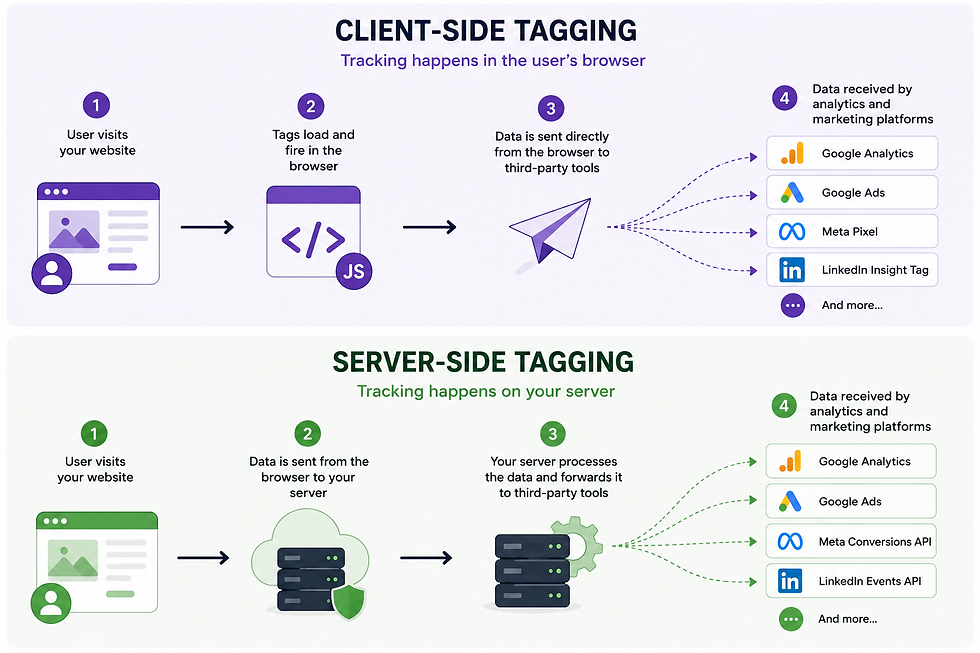
Client-side tracking is how most websites collect analytics data today. When someone visits your website, tracking scripts run directly in their browser. These scripts collect information about page views, clicks, purchases and other interactions before sending that data to platforms such as Google Analytics, Google Ads, Meta and LinkedIn.
In simple terms:
Visitor → Browser → Analytics Platform
This approach is quick to implement, widely supported and works perfectly well for many businesses. However, it does have some limitations.
Because tracking happens in the visitor's browser, it can be affected by:
Ad blockers
Browser privacy settings
Cookie restrictions
Tracking prevention features in Safari and Firefox
Users declining consent
As privacy protections continue to evolve, many organisations are finding that some data simply never reaches their analytics platforms.
What Is Server-Side Tracking?
Server-side tracking introduces an additional step.
Instead of sending data directly from the user's browser to Google Analytics or advertising platforms, the data is first sent to a server that you control.
That server then processes the information and forwards it to the relevant platforms.
The process looks like this:
Visitor → Browser → Your Server → Analytics Platform
This gives you greater control over how data is collected, processed and shared.
It doesn't magically bypass privacy laws or consent requirements, but it can improve the reliability and quality of your tracking setup. By passing the data from your servers (which is first party) rather than a browser (which is third party) it is far less likely to be restricted by third party cookie blockers, browser restrictions etc.
Want an Analogy? Let's Use Airport Security
Client-Side Tracking
Imagine several different companies want information about every passenger arriving at an airport. Each company stands outside the terminal and tries to ask passengers questions directly.
Some passengers stop. Some are in a hurry. Some refuse to answer questions. Some are hidden behind sunglasses so no one knows who they are. Some of the companies asking questions get moved on by security so they don't hassle the passengers.
Each company gets a slightly different picture of what's happening. Some get the whole picture. Some get a partial picture. Some get no useable info at all.
Server-Side Tracking
Now imagine every passenger passes through airport security first. Security records the information once, checks it, and then shares the relevant details with each company. In this case, security is your server.
Why Are Businesses Moving Towards Server-Side Tracking?
The biggest reason is data quality. Many organisations have noticed gaps appearing in their analytics due to browser restrictions and increasing privacy controls.
Improving Data Accuracy
Because data passes through your own server first, there is often less reliance on third-party cookies and browser-based tracking methods. This can reduce data loss and improve attribution accuracy.
Giving You More Control
Server-side setups allow you to decide exactly what data is passed to different platforms. For example, you might choose to remove unnecessary information before forwarding data to advertising platforms.
Supporting Privacy and Compliance
A server-side architecture can make it easier to manage what data is collected and where it is sent. This can be particularly useful for organisations with strict compliance requirements.
Enhancing Advertising Platforms
Platforms such as Meta and Google increasingly encourage server-side implementations because they can improve conversion tracking and campaign measurement. Examples include Meta's Conversion API (CAPI) and Google's Enhanced Conversions.
Does Server-Side Tracking Replace Cookies?
No. This is one of the biggest misconceptions. Server-side tracking is not a way to avoid consent requirements or privacy regulations. If a user declines analytics or advertising cookies, you still need to respect those choices. Server-side tracking is primarily about improving data collection and giving organisations more control over how tracking works.
Is Server-Side Tracking Right for Every Business?
Not necessarily. For many small businesses, a well-configured GA4 and Google Tag Manager setup will provide more than enough insight. Server-side tracking introduces additional complexity, ongoing costs and technical management.
You may want to consider it if:
Accurate attribution is critical to your business
You invest heavily in paid advertising
You have complex tracking requirements
You operate in a privacy-sensitive industry
You're seeing significant gaps in your analytics data
For many organisations, the biggest wins still come from fixing basic measurement issues before investing in a server-side solution.
So What?
Server-side tracking is becoming an increasingly important part of modern analytics and advertising measurement, but it isn't a silver bullet. The best tracking setup is one that balances accuracy, privacy, practicality and business needs.
Before investing in server-side tracking, it's worth making sure your existing analytics implementation is configured correctly. In my experience, many businesses can significantly improve the quality of their data through better GA4 configuration, conversion tracking and reporting before they need to consider more advanced solutions.
If you're unsure whether your current analytics setup is giving you accurate, reliable data, get in touch to discuss a GA4 audit or measurement review.

Comments